Did you ever stop to consider how much digital crud festers on your Linux machine? Browser caches, old package archives, forgotten temporary files – they all add up. Most users just ignore it. A shame, really.
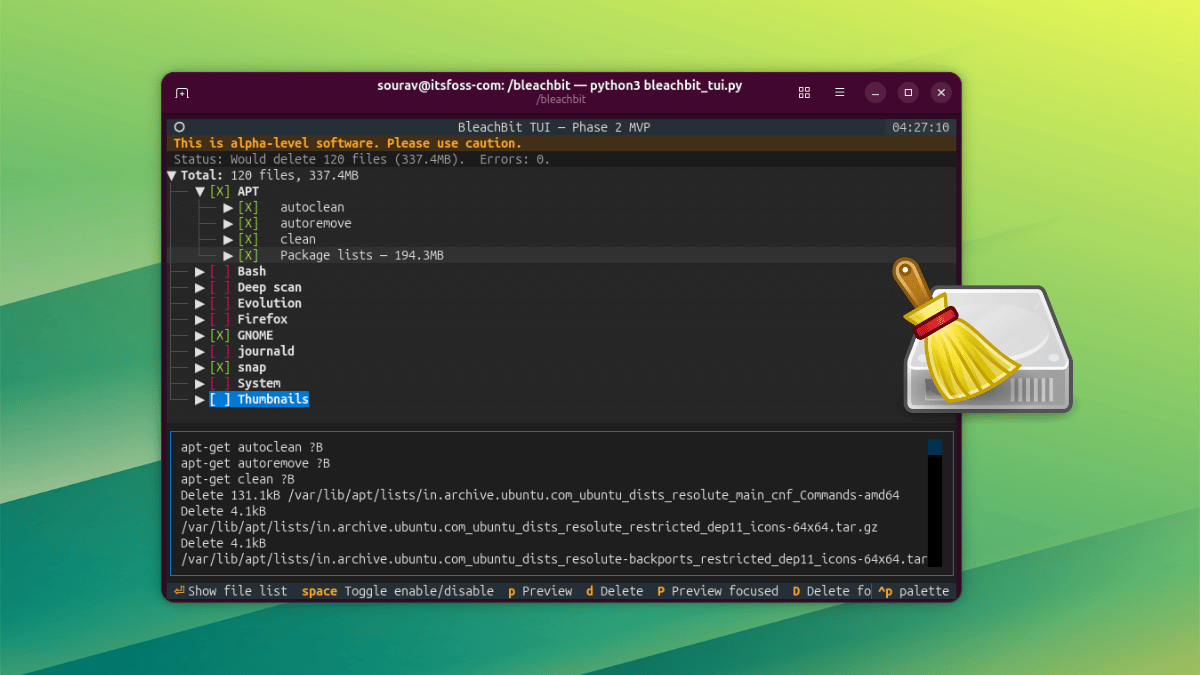
Now, BleachBit, a name most Linux and Windows users are familiar with for tidying up this digital detritus, has unleashed a text-based user interface (TUI). Yes, another command-line tool. Because the world clearly needed more ways to stare into the abyss of system logs.
Does BleachBit’s TUI Actually Work? The Short Answer.
It works. Shocking, I know. For a tool that deals with deleting things, it’s surprisingly… functional. Navigating the TUI is straightforward. The space bar is your friend for toggling cleaning options. Enter expands categories. Simple. Effective. Almost too simple for some of you power users out there.
Previewing the damage is handled by p (all selected items) or P (just the focused bit). Handy if you’re feeling particularly cautious, or just want to see just how much virtual junk you’re about to evict. Deletion is a two-stage affair: d for global deletion, D for the granular approach. My first attempt, naturally, failed. Elevated privileges, folks. sudo python3 bleachbit_tui.py. A classic tale of user error meeting system security. Once that was sorted, a confirmation prompt and a tidy little dialog box showing space recovered. It’s all there. The backend is the same as the GUI, so your settings are safe. Themes and mouse support? Surprisingly, yes. Even on Windows, it’s offered as both installer and portable. Fancy.
Why Would You Bother With Another Cleaner?
Look, the GUI version of BleachBit has been around for ages. It’s got its fans. But for those of us who live in the terminal, or who just prefer a stripped-down experience, this TUI is a welcome addition. It’s faster. It’s less resource-intensive. And frankly, it feels more proper for system administration tasks. No need to fire up a full desktop environment just to clear out some thumbnails.
This isn’t just about freeing up a few megabytes. This is about control. About understanding what’s taking up space. The TUI strips away the visual fluff and gets straight to the point. It’s a refreshing change from the over-engineered GUIs that seem to proliferate these days. It’s a reminder that sometimes, the simplest interface is the most powerful.
It’s also worth remembering that BleachBit isn’t just about deleting temporary files. It can shred sensitive data, wiping free space to make deleted files unrecoverable. This TUI maintains that functionality. So, if you’re selling a machine or just want an extra layer of privacy, this tool is still your ally. It’s a subtle but important point that gets lost in the rush to just ‘clean things up.’
Since the TUI shares its backend with the regular BleachBit GUI, it picks up all the same settings automatically. That covers your selected cleaning options, keep list, custom cleaning list, and cookie keep list.
This is the crucial part. It means you’re not reinventing the wheel. Your carefully curated lists of things not to delete? They’re still respected. Your custom cleaning scripts? They’re still there. It’s not a separate, orphaned tool; it’s an evolution of an existing one. That’s good design. That’s sensible development.
I tested it on Ubuntu, and the instructions were indeed quick-start. For the masochists among you, building from source is always an option. For everyone else, point your package manager (or your browser, if you’re downloading) towards the latest release.
Is This a Threat to My Existing Cleanup Workflow?
Probably not. Unless your workflow involves meticulously clicking through a graphical interface, then maybe. But for most command-line junkies, this TUI slotting into their existing scripts or being run interactively is a boon. It’s an enhancement, not a replacement. Think of it as adding a specialized tool to your toolbox. It doesn’t make your hammer obsolete.
This is less about replacing the GUI and more about offering an alternative. An alternative that, for certain tasks and certain users, is demonstrably better. It’s about choice. And in the open-source world, choice is usually a good thing.
**
🧬 Related Insights
- Read more: Docathons: The Hackathon Hack That Saves Open Source Docs from Oblivion
- Read more: Solana TX Failures Cost Money: What Backend Devs Must Know
Frequently Asked Questions**
What does BleachBit TUI actually do? BleachBit TUI is a text-based interface for the BleachBit system cleaner, allowing users to clean browser caches, old package archives, temporary files, and securely shred files directly from the command line.
Will BleachBit TUI delete my important files? BleachBit TUI includes preview and confirmation steps to help prevent accidental deletion. However, it’s essential to review what will be cleaned before confirming. Always back up important data before running any system cleaning utility.
Is BleachBit TUI free and open source? Yes, BleachBit and its TUI are free and open-source software, meaning you can use, modify, and distribute it freely.