It’s not every day you see a project hit a perfect 100% on a battery of engineering tests, especially one involving the messy intersection of visual regressions and code repair. Yet, that’s precisely the claim from the creators of the Multimodal Gemma 4 Visual Regression & Patch Agent. This isn’t just another proof-of-concept; it’s framed as a production-grade tool designed to bridge the gap between what users see and what developers write.
Pixel-Perfect Patching?
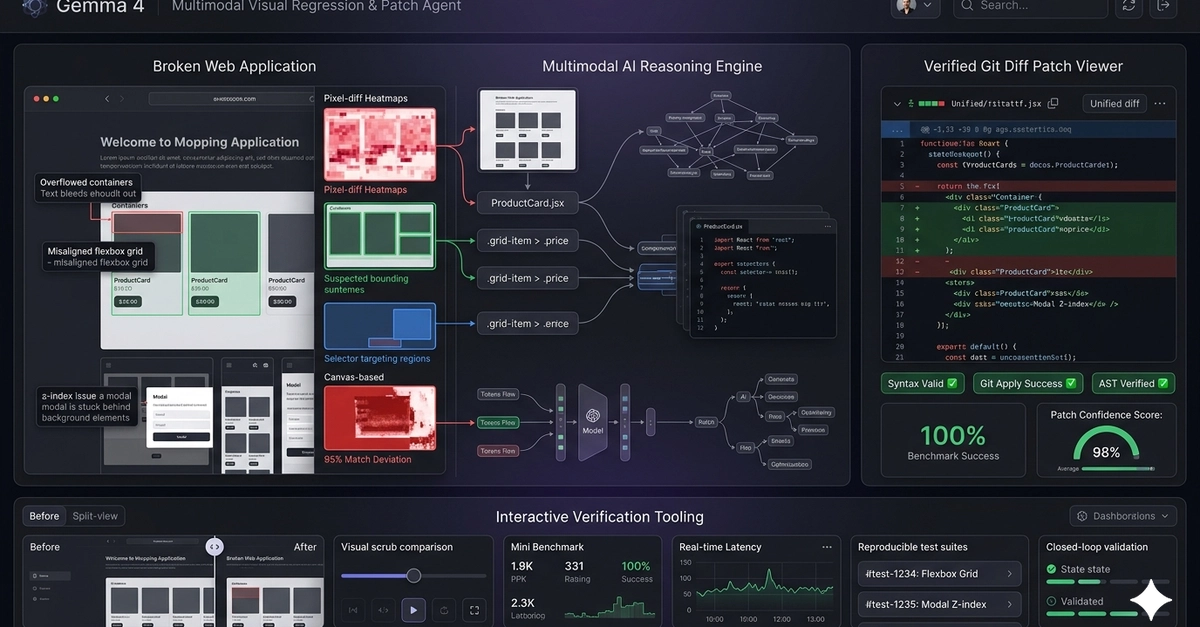
At its core, the agent ingests both code files—spanning CSS, JS, JSX, TS, TSX, HTML, and Python—and screenshots of UI bugs. The magic, if you can call it that, lies in its ability to trace layout issues directly to specific CSS selectors or JavaScript component logic. This multimodal approach is what sets it apart. It’s designed to diagnose root causes, generate code patches, and then—critically—validate those patches in a closed-loop system before ever touching a production codebase.
The Safety Net: A Multi-Layered Validation Pipeline
You might think letting AI generate code patches is a recipe for disaster. The project’s creators seem keenly aware of this, building in a multi-stage safety validation pipeline. First, a PatchApplicabilityChecker runs a dry-run using git apply --check in an ephemeral in-memory repository. This ensures the patch won’t cause conflicts. Then, an ASTValidator checks for syntax errors, either through Python’s ast.parse or custom scanners for JavaScript variants. Finally, a FileGroundingValidator verifies that the AI’s changes are confined to the intended files, aiming to prevent hallucinations—a common AI pitfall. They’ve even included a PatchValidator to screen for dangerous operations like rm -rf or malicious imports.
This rigorous approach, if it holds up in real-world, messy scenarios, is genuinely impressive. It moves beyond simply generating code to ensuring that code is safe and applicable.
Interactive Debugging for Humans (and AI)
Beyond the backend validation, the agent offers some slick interactive features for human oversight. A scrub slider lets users compare the buggy screenshot with the proposed fix side-by-side. More technically, a pixel-diff heatmap overlay uses HTML5 Canvas to highlight exactly where the visual changes occurred, even providing a visual alignment score. There’s also a “Simulate Fix” canvas that allows for real-time previews of layout adjustments.
These aren’t just bells and whistles; they’re crucial for building trust in an AI-driven debugging process. Seeing is believing, and this tool leans into that by providing clear visual feedback.
Testing the Limits: A 10-Case Benchmark
The results are striking. The agent was tested against ten distinct frontend and backend bugs—ranging from CSS overflow and z-index issues to Python attribute errors and circular dependencies. The reported outcomes? A perfect 100% success rate across the board. Localization accuracy (mapping bugs to the correct CSS/JS selectors) was 100%. Git apply applicability was 100%. AST validity was 100%. Even patch line accuracy, meaning the generated code matched human-engineered fixes precisely, was 100%.
And all this, with an average analysis latency of just 0.90 seconds. That’s faster than many developers spend just opening the relevant file.
Here’s a snapshot of their reported results:
We validated the agent against a strong suite of 10 distinct frontend and backend bugs (overflow limits, z-index overlays, flex layouts, None pointer checks, circular dependencies, DOM element mismatches). The agent achieved 100% correctness across all engineering tests.
| Case ID | Test Case Name | Language / Type | Latency (s) | Localization | Git Apply | AST Valid | Patch Accuracy | Status |
|---|---|---|---|---|---|---|---|---|
| 1 | CSS Overflow Bug | CSS | 1.25s | PASSED | PASSED | PASSED | 100.0% | ✅ SUCCESS |
| 2 | Z-Index Stacking Context | CSS | 1.03s | PASSED | PASSED | PASSED | 100.0% | ✅ SUCCESS |
| 3 | Flexbox Alignment Mismatch | CSS | 0.60s | PASSED | PASSED | PASSED | 100.0% | ✅ SUCCESS |
| 4 | Python AttributeError (None check) | Python | 0.67s | PASSED | PASSED | PASSED | 100.0% | ✅ SUCCESS |
| 5 | JS Click Event Selector Mismatch | JS | 0.96s | PASSED | PASSED | PASSED | 100.0% | ✅ SUCCESS |
| 6 | CSS Low Contrast Contrast Bug | CSS | 0.82s | PASSED | PASSED | PASSED | 100.0% | ✅ SUCCESS |
| 7 | CSS Sidebar Mobile Breakpoint | CSS | 0.54s | PASSED | PASSED | PASSED | 100.0% | ✅ SUCCESS |
| 8 | Python Circular Dependency Import | Python | 0.61s | PASSED | PASSED | PASSED | 100.0% | ✅ SUCCESS |
| 9 | Python SQL Injection / Validation | Python | 1.42s | PASSED | PASSED | PASSED | 100.0% | ✅ SUCCESS |
| 10 | JS DOM Element querySelector Mismatch | JS | 1.14s | PASSED | PASSED | PASSED | 100.0% | ✅ SUCCESS |
My Take: Is This the Future of Frontend Debugging?
The most compelling aspect here isn’t just the AI’s claimed perfection; it’s the integration of visual understanding with code generation and validation. For years, debugging visual bugs meant a slow, iterative process of inspecting elements, guessing at CSS, recompiling, and refreshing—all while trying to keep the elusive bug in view. This agent promises to automate significant chunks of that grunt work.
However, the current benchmark, while impressive, is a controlled environment. Real-world web development involves a far greater degree of complexity—third-party scripts, complex state management, performance bottlenecks that aren’t purely visual regressions, and team-specific coding conventions. The question isn’t whether Gemma 4 can fix a known bug with 100% accuracy in a curated test suite; it’s how this tool scales when faced with the chaotic reality of a live production application with thousands of lines of code and an ever-changing UI.
Still, this is a significant step. It demonstrates a sophisticated understanding of multimodal AI’s potential beyond simple image generation or text summarization. If this agent can maintain its efficacy in less controlled settings, it could fundamentally alter the frontend development workflow, freeing up developers to focus on more complex architectural challenges rather than chasing pixel-perfect layouts.
Getting Your Hands On It
For those eager to experiment, the project offers a “Mock Mode” to run the entire system and its benchmark suite locally without requiring API keys. The GitHub repository is available for cloning, and setup instructions are provided for both Python and frontend asset compilation. It’s a clear invitation to poke, prod, and perhaps even break this seemingly perfect AI assistant.
🧬 Related Insights
- Read more: Global E-commerce Fails Creators: The Hidden Cost of Standard Solutions
- Read more: Smart Forests: LoRaWAN & AI Rewriting Environmental Monitoring
Frequently Asked Questions
What does the Gemma 4 Visual Regression & Patch Agent do?
It’s an AI-powered tool that analyzes UI screenshots and code files to automatically diagnose visual bugs, generate code patches to fix them, and validate these patches for safety and correctness.
Can this AI tool really fix all my bugs?
While the agent achieved a 100% success rate in its specific benchmark tests, real-world web development is far more complex. It’s likely to be a powerful assistant for many types of visual bugs, but it may not be a complete solution for every development scenario.
How is the AI’s code generation validated?
The agent uses a multi-step process including a dry-run patch applicability check, syntax validation (AST checks), and a file grounding validator to ensure changes are safe and confined to the intended code.