Did you ever stop and wonder if your CI pipeline’s green light is actually a signal of success, or just a well-disguised lie?
It’s a question that probably hasn’t crossed your mind. After all, green CI means tests are passing, PRs are merging, and the code is, ostensibly, good to go. But as one developer recently discovered after a TypeScript migration, the absence of failures doesn’t equate to the presence of correctness. The system can be actively broken, with absolutely nothing in the logs to betray it.
This isn’t about a complex new vulnerability or a catastrophic logic error. No, this was far more insidious. A migration from JavaScript to TypeScript for a test project doubled the CI runtime. Zero failures. Zero errors. Just… slower. At first glance, this symptom — a creeping increase in execution time — might seem like a normal byproduct of adopting a new language or compilation step. The default assumption, and the one this particular developer made, was simple: TypeScript compilation overhead. Plausible. A story the system seemed to tell itself, and one that allowed the real problem to fester.
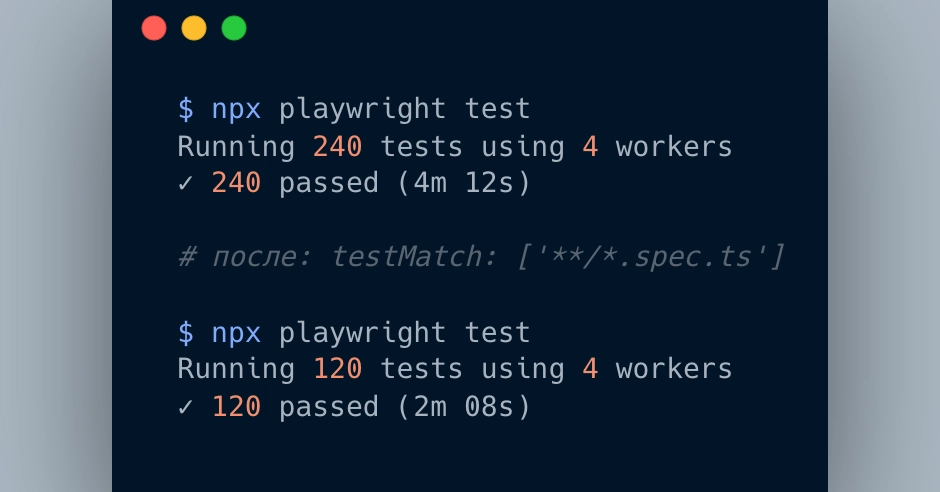
It was only by sheer accident, as the original .js files were being purged, that the anomaly became glaringly obvious. The test count plummeted by nearly half, from around 240 tests down to roughly 120. This wasn’t a minor discrepancy; it was a fundamental structural error. Tests hadn’t been removed. The old JavaScript files, which were supposed to be redundant, were still there, and crucially, the test runner was picking them up alongside their new TypeScript counterparts.
Playwright, the tool in question, was configured without an explicit testMatch in its playwright.config.ts. Its default glob patterns, by design, matched both .spec.js and .spec.ts files. The consequence? Every single test in the suite was running twice. The same assertions, the same setup, the same teardown — all duplicated, executing in parallel, and crucially, without a whisper of a warning. The CI pipeline was not only oblivious, it was actively contributing to the deception, its gradual runtime increase masquerading as a normal post-migration slowdown.
The worst part wasn’t the wasted time. It was that CI made it look like things were improving. Runtime crept up gradually, which read as “normal post-migration slowdown.” I had a plausible story for the symptom, so I stopped looking.
This highlights a critical, often overlooked, facet of automated testing: CI validates execution, not necessarily correctness. A green build signifies that nothing crashed during the execution phase. It doesn’t inherently guarantee that the correct tests ran, that the quantity was as expected, or that the underlying assumptions about the environment remained sound. The fix, in this instance, was a single line of configuration: testMatch: ['**/*.spec.ts']. Yet, uncovering that simple line took far longer than it should have, precisely because the existing system provided no mechanism to detect the duplication.
What’s the takeaway? Most issues within test systems don’t manifest as traditional failures. Instead, they surface as duplicated execution, silent performance degradation, or unexpected runner behavior changes that aren’t tied to any modifications in the tests themselves. These subtle disruptions fly under the radar because we often don’t design our pipelines with alerts for these specific scenarios.
The Hidden Cost of Silent Degradation
This case vividly illustrates the danger of what I’m calling Silent Failures in Test Automation. The failure signature is deceptively benign: CI remains green, runtime doubles, test count doubles, and there are zero warnings. The hidden assumption is that a slower CI run inherently implies a normal post-migration overhead, when in reality, the runner might have been doing twice the work for weeks, completely undetected.
Why Does This Matter for Developers?
It matters because the integrity of our development workflows hinges on trust in our tooling. When CI systems, the gatekeepers of code quality, actively mislead us, the entire development lifecycle becomes fragile. This isn’t just about wasted engineering hours; it’s about the potential for genuinely critical bugs to slip through the cracks, masked by a facade of success. The solution proposed – a simple discovered tests counter in CI that fails the build if the count deviates from the expected value – is a pragmatic step towards building more resilient pipelines. Integrating the buggy configuration as a reproducible artifact for diagnostic purposes further reinforces this proactive approach.
This experience serves as a stark reminder: vigilance extends beyond simply watching for red. We must actively design for the detection of anomalies, even when the lights are green.
Failure Signature: - CI green - Runtime doubled - Test count doubled - Zero warnings
Hidden Assumption: “I assumed a slower CI run meant normal post-migration overhead. The runner had been doing twice the work for weeks — silently, without a single warning.”
(Full project: API + UI + E2E + CI + AI endpoint available on GitHub as part of the Silent Failures in Test Automation series.)
🧬 Related Insights
- Read more: Wayland’s Long-Awaited Session Savior: xdg-session-management Finally Merges After 6 Years
- Read more: Web Dev Tackles ML [30-Day Report]
Frequently Asked Questions
What is CI? CI stands for Continuous Integration, a practice in software development where developers merge their code changes into a central repository frequently, after which automated builds and tests are run. A “green” CI typically means all automated tests have passed.
Can test duplication cause CI to fail? Test duplication itself doesn’t directly cause a CI build to fail unless it leads to timeouts or other specific error conditions. However, as this article shows, it can go undetected, doubling execution time and masking underlying issues, while CI still shows as green.
How can I prevent duplicated tests in my CI pipeline?
Ensure your test runner’s configuration (like Playwright’s testMatch or testIgnore in playwright.config.ts) precisely targets your test files. Regularly review your test count and execution times for unexpected changes. Consider adding explicit checks in your CI pipeline to verify the number of tests discovered against an expected baseline.