So, GitHub’s got a new app. Not just some flashy update to the IDE plugin you’ve probably got buried in your extensions folder, mind you. This is a desktop thing. A whole new surface for what they’re calling ‘agentic development.’ And before you roll your eyes so hard they get stuck, hear me out. The pitch is this: stop bouncing between your editor, your terminal, and a dozen browser tabs just to push a single change. They want to keep all that context—the issues, the PRs, the conversations—right there, accessible on your desktop, outside the confines of your code editor. Fancy.
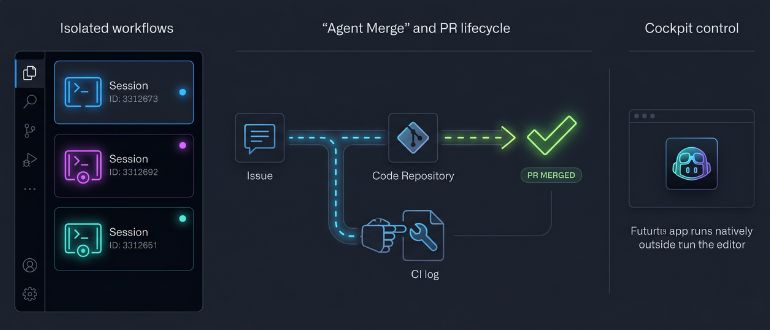
Forget trawling through Stack Overflow or digging through old commit messages. The app’s designed to pull from the work already on GitHub. You start with an issue or a pull request, and each task gets its own isolated ‘session.’ Think of it as a digital sandbox for each job you’re tackling. You can pause it, walk away, grab a coffee, and come back exactly where you left off, thread perfectly intact. This isn’t just a minor tweak; context switching is a productivity killer, and if this actually delivers on its promise, it’s a genuine win for anyone juggling more than one project.
Agent Merge: The Real Hook?
The most intriguing part? ‘Agent Merge.’ This isn’t just about writing code; it’s about shipping it. This feature is supposed to watch your CI checks, download failure logs if things go sideways, resolve those infuriating merge conflicts that pop up like whack-a-moles, and then push the fixes. All automatically. Before it merges. Imagine: no more chasing down flaky tests because of a minor dependency hiccup. This aims to automate the tedious, soul-crushing back-and-forth that plagues pull request lifecycles. If it works as advertised, it’s a big deal for freeing up developer time for actual problem-solving, not busywork.
The ability to run multiple agent sessions across repositories simultaneously, each isolated and tracked, certainly sounds powerful. Recurring workflows can be automated, and agents can even be extended with custom skills. As Mitch Ashley over at The Futurum Group put it:
The agent surface is moving from the browser tab to the desktop client. Agentic workflows need persistent local sessions, async execution, and cross-repo visibility that survives context switches. The Copilot app gives developers fewer interruptions per task and a cockpit outside the editor.
He also notes that this move puts GitHub in direct competition with other desktop AI tools like Cursor and Claude Code. But GitHub’s real ace? Integration. All your existing work—issues, PRs, branch protection rules, CI pipelines—is already on their platform. This new app doesn’t force you to shoehorn your context into a brand-new tool; it starts where you live.
Who’s Paying for This New Frontier?
Let’s get to the bottom line, because that’s always the most interesting part in Silicon Valley. Who’s actually footing the bill for this shiny new desktop experience? Well, it’s not for everyone, at least not yet. GitHub’s clearing its Pro+, Business, and Enterprise plan tiers from the waitlist first. So, if you’re on a paid Copilot seat, you’re in line for early access. Pro subscribers can also sign up for the preview as it expands. This isn’t some freebie giveaway; it’s tied directly to their premium offerings.
Does This Mean My Job is Toast?
Beyond individual productivity, this has serious implications for DevOps teams. When an AI agent can spot a CI failure, fix it, and push the solution without a human needing to context-switch, that’s not just a small improvement; that’s a compression of the development cycle. This aligns with GitHub’s broader push: cloud agent sessions launching directly from Visual Studio, a Debugger agent that validates fixes against live runtime behavior, and wider support for custom agents. The GitHub Copilot app is the embodiment of this vision. The agent is no longer just a helper; it’s becoming a collaborator, a full-fledged team member capable of taking a task from initial idea to merged pull request, with the developer taking on a more supervisory, steering role rather than getting bogged down in the grunt work. This is a seismic shift for development workflows, and whether organizations will fully embrace this new paradigm remains to be seen—but the direction is clear.
It’s a brave new world where the AI doesn’t just suggest code but orchestrates its journey to production. Whether this becomes the indispensable tool they’re touting or just another shiny distraction will depend on its real-world performance and, of course, how much it costs to keep it running.
🧬 Related Insights
- Read more: HarmonyOS Hits 55M Devices: What It Means for YOU
- Read more: GPT-4o, React 19: What It Actually Means for Developers
Frequently Asked Questions
What does the GitHub Copilot app actually do?
The GitHub Copilot app is a desktop application designed for ‘agentic development,’ allowing developers to manage tasks from issue to merged pull request using AI, all outside their traditional IDE.
Is GitHub Copilot app free?
No, access to the GitHub Copilot app is currently part of paid GitHub Copilot plans, starting with Pro+ and extending to Business and Enterprise tiers.