It’s a quiet epidemic plaguing the performance testing world: API keys, tokens, and credentials, once essential for simulating real user behavior, are increasingly scattered like digital breadcrumbs across test scripts, configuration files, and environments. This sprawl, according to Grafana Labs, “increases the risk of exposure and makes tests harder to manage and maintain.” The sheer volume of these tests, especially as organizations scale their operations and complexity, means this isn’t just a minor inconvenience; it’s a significant, often unaddressed, security vulnerability.
And now, Grafana Cloud k6 is stepping up to the plate with the introduction of secrets management. This isn’t just a cosmetic update; it’s a fundamental shift in how performance tests can be architected and secured. The platform, built on the open-source k6 OSS, will now allow users to securely store and inject sensitive values directly into their load tests. Think about it: no more hardcoded tokens sitting in plain sight in your Git repository, no more convoluted manual distribution of credentials. It’s a move that directly targets the messy reality of modern development workflows.
The ‘Write-Only’ Security Model
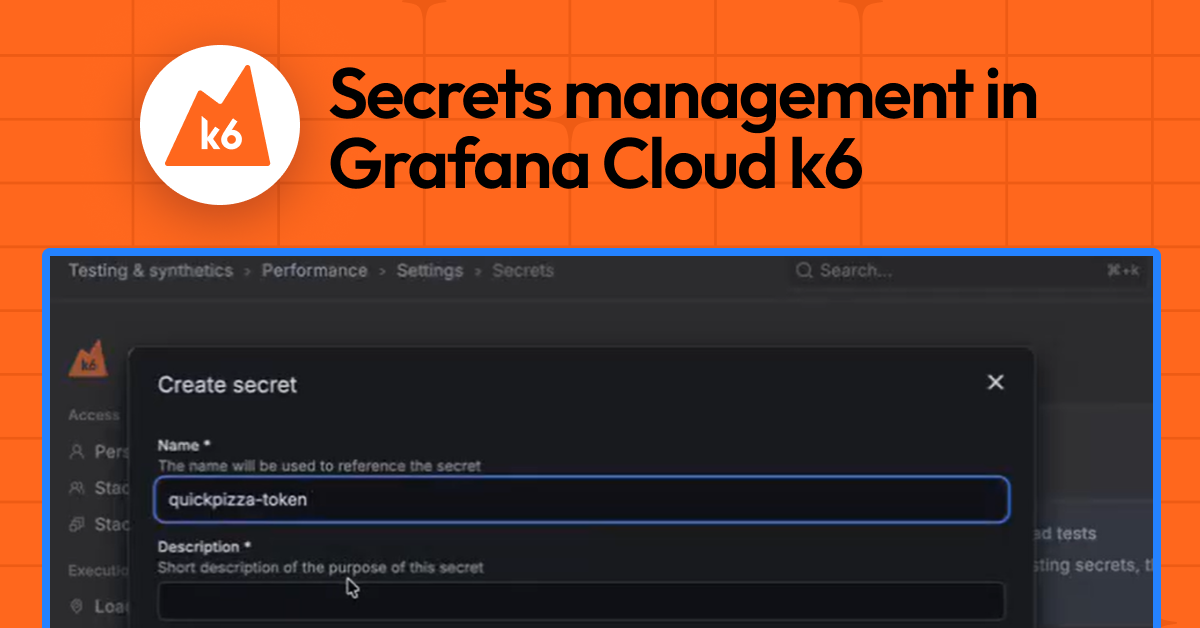
Here’s where Grafana’s approach gets interesting, and frankly, sensible. Secrets aren’t just tucked away; they’re designed with a strict security posture. Once a secret is created within the Grafana Cloud UI—named, described, and given its value—that value is effectively write-only. You can’t retrieve it, you can’t see it again. This isn’t some arbitrary limitation; it’s a deliberate design choice to prevent accidental leakage. No screenshots, no accidental screen-sharing sessions revealing the goods. This aligns perfectly with best practices in secure credential handling, where minimizing exposure points is paramount.
Management is straightforward enough from the UI: create, edit, and delete. Editing a secret means providing a new value, not revealing the old one. This ensures that even if the UI itself were somehow compromised (a big ‘if’), the actual sensitive data wouldn’t be exfiltrated through a casual browsing session.
Injecting Secrets into the Test Workflow
The real magic, however, happens when you integrate these secrets into your k6 tests. Grafana provides a dedicated module, k6/secrets, that acts as the conduit. At runtime, when your test script needs a specific API token or credential, it simply requests it by name using secrets.get('your-secret-name'). The platform then smoothly injects the value. This means your scripts remain cleaner, and crucially, they become more portable. The same test can be deployed across different environments—staging, production, or a specific client’s setup—simply by configuring the appropriate secrets in each Grafana Cloud instance, rather than rewriting the test itself.
import check from "k6";
import http from 'k6/http';
import secrets from 'k6/secrets';

export default async function main () {
  const apiToken = await secrets.get('api-token');
  const headers = {
    Authorization: `Bearer ${apiToken}`,
  };
  console.log("Headers: " + JSON.stringify(headers))
  let res = http.get('https://example.com/api', {headers: headers});
  check(res, { "get executions status is 200": (res) => res.status === 200 });
}
This code snippet, borrowed directly from the announcement, illustrates the elegant simplicity. The apiToken variable, once a potential vector for leaks, is now a runtime fetch operation. It behaves like any other string variable, making integration feel natural, almost too easy.
Beyond Exposure: Redaction is Key
But Grafana hasn’t stopped at just secure storage and injection. They’ve also considered the observability aspect. What happens if, during debugging or logging, a developer accidentally tries to log a secret? Grafana Cloud k6 automatically redacts these values in the test output. This is a critical layer of defense. It means that even if the best intentions lead to a slip-up in the script itself, the sensitive data isn’t broadcasted in your logs, again mitigating the risk of accidental leaks. It’s a comprehensive approach, touching on storage, usage, and even disposal (in the form of redacted logs).
A Strategic Necessity, Not a Luxury
Look, performance testing, at scale, is an increasingly sophisticated endeavor. It’s no longer just about hitting an endpoint a million times. It involves complex user flows, authentication mechanisms, and interaction with a diverse set of APIs and services. Each of these interactions often requires unique credentials. The traditional method of managing these—environment variables, .env files checked into repositories (a cardinal sin), or custom secret stores—has become unwieldy and, frankly, insufficient for many teams.
This move by Grafana Cloud k6 isn’t just a feature; it’s a strategic imperative. As companies embrace CI/CD pipelines and automated testing becomes more ingrained, the security of the testing process itself must be a top priority. The ability to centralize, secure, and automate the management of these sensitive test parameters makes for cleaner code, more maintainable tests, and, most importantly, a significantly reduced attack surface. It’s about treating performance testing infrastructure with the same security rigor as production infrastructure.
My only critique, if you can call it that, is that this feature is only now emerging from public preview. The market has been clamoring for this kind of integration for a while. It’s a proof to the growing maturity of performance testing as a discipline, demanding enterprise-grade security features, not just raw performance metrics.
🧬 Related Insights
- Read more: AI Phone Answering: Latency’s Dirty Secret
- Read more: Linux 7.0 Flips the Switch: ASUS Armoury Crate Powers Up Three Beastly Gaming Laptops
Frequently Asked Questions
What exactly does Grafana Cloud k6 secrets management do? It allows you to securely store API keys, credentials, and other sensitive data in Grafana Cloud and then inject them into your performance tests at runtime without hardcoding them into your scripts.
Will this feature replace my existing credential management system? It’s designed to replace the need for manual credential management within your performance tests. You’ll still need a system for managing broader infrastructure secrets, but this directly addresses the specific needs of k6 load scripts.
Is this feature available for self-hosted k6? This specific implementation of secrets management is part of Grafana Cloud. For self-hosted k6, you would typically manage secrets using environment variables or other external secret management tools integrated into your CI/CD pipeline.