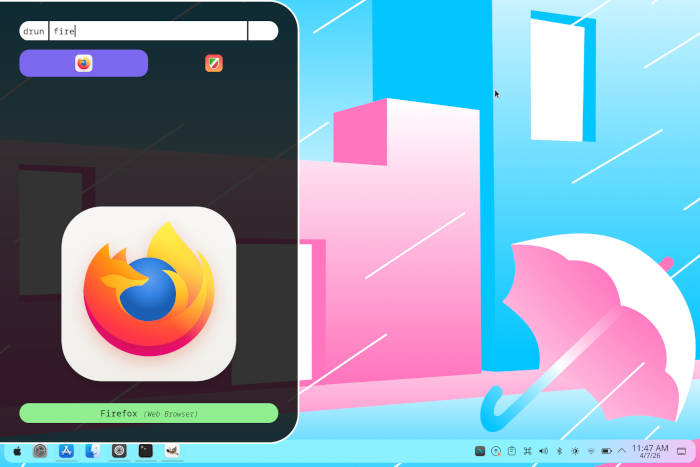
Super key slams down — apps cascade like shooting stars across a velvet-black sky.
That’s the rush of Rofi, the keyboard launcher that’s got Linux power users hooked. And if you’re on Wayland? Wofi steps in, mirroring the magic without missing a beat. These aren’t gimmicks; they’re the home-row revolution, keeping your hands glued to the keys where they belong, ditching the mouse for something purer, faster — almost telepathic.
Picture this: you’re deep in code, flow state unbreakable. No fumbling for icons, no menu mazes. Just type, select, launch. Rofi and Wofi embody that keyboard-first ethos, turning your Linux desktop into a cockpit for creators. It’s like Quicksilver on old Macs — remember that? The launcher that made Spotlight jealous. But here’s my twist: in an era where AI agents whisper commands, these FOSS gems prove human ingenuity still outpaces the hype. They’re the unsung heroes prepping us for a command-line renaissance.
Why Rofi and Wofi Beat Your Desktop’s Built-in Launchers?
Built-ins? They’re cute — for casuals. But tap Super on a stock GNOME or KDE setup, and you’re wading through bloated menus, icons screaming for attention. Rofi? Lean, mean, customizable to hell. Type ‘fire’ — Firefox blasts open. Switch windows with ‘win’ mode. It’s not just launching; it’s sorcery.
The original scoop nails it:
The difference between run and drun is that the run mode shows executable files, allowing you to quickly search for and launch programs, whereas drun mode displays .desktop files of installed applications.
Spot on. Run for raw power — any binary on your path. Drun for polished DE integration. And ssh mode? Beam into remote servers without Alt-Tab hell. Wofi apes this on Wayland, though it’s still baking — less polish, same punch.
But wait — X11 loyalists rejoice. Rofi’s mature, battle-tested on Ultramarine, Fedora, wherever. Wayland refugees? Wofi’s your bridge, installable via repos everywhere. No compiling nightmares.
Installing Rofi: Two Commands to Keyboard Nirvana
Ubuntu? sudo apt install rofi -y. Boom. Fedora: sudo dnf install rofi -y. Arch: sudo pacman -Sy rofi. That’s it — no Flatpak cruft, pure distro bliss.
Post-install, menu sprouts ‘rofi’ and ‘rofi-theme-selector’. Fire it up default: window mode shines in tilers like i3. Stacking WM? Edit that menu entry — swap to rofi -show run. KDE? Right-click, Edit Application, tweak command. Save. Now Super+your-shortcut unleashes app Armageddon.
Here’s the game-changer: bind it globally. Plasma’s shortcuts tab — rofi -show run to Mod4+Space. GNOME? Extensions galore. XFCE? Keyboard settings. Suddenly, your desktop bends to you.
Themes? Oh man. rofi-theme-selector — grids of glassy, cyberpunk, minimalist skins. Pick ‘solarized-dark’ — feels like hacking the Matrix. Tweak configs in ~/.config/rofi/config.rasi for font tweaks, padding, icons. It’s LEGO for your launcher.
Wofi whispers the same spells on Wayland. sudo apt install wofi (Debian et al.), dnf wofi, etc. Lacks some modes — no ssh yet — but run/drun/window? Check. Bind to Super+/, watch Sway or Hyprland hum.
And the insight no one’s shouting: this is Linux catching the vim ethos. Remember vi? Fingers never leave home row. Rofi/Wofi? Same vibe, GUI edition. In a touchless, voice-AI world, keyboard fluency wins. Prediction: by 2026, every DE ships rofi-like defaults. Mice? Relics.
Power Moves: Scripts, File Search, Beyond Launching
Rofi devours scripts. Pipe dmenu-style: ls ~/ | rofi -dmenu for instant file pickers. Window switcher on steroids — thumbnails, urgency highlights. Combine with xdotool for automation wizardry.
Say you’re tiling: rofi -show window -sidebar-mode 1 — vertical sidebar, no overlap. Or emoji picker: rofi -show emoji. It’s a Swiss Army knife disguised as a launcher.
Wofi trails but closes fast. Wayland purity means no X11 hacks needed. Hyprland users rave — crisp, compositor-native.
Critique time: Rofi’s Wayland port lags (xwayland kludges glitchy). Wofi’s simpler, but misses rofi-script depth. Corporate spin? Nah, pure FOSS — no Red Hat overlords. Just devs iterating in GitHub shadows.
Deep customization rabbit hole: fonts via font: "FiraCode Nerd 12";. Colors? Hex parties. Scrollbars? Slim or gone. Share themes on rofi.themes — community goldmine.
Productivity spike? Measure it. Pre-rofi: 5 seconds menu hunt. Post: 1 second type-launch. Compound over a day? Hours saved. That’s the futurist fuel — efficiency as superpower.
The Keyboard Future: Why This Matters Now
Linux desktops evolve — Pop!_OS, Ultramarine polish the UX. But rofi/wofi? They future-proof you. AI copilots like GitHub Copilot type for you; these launch for you. Hands stay put, brain races ahead.
Historical parallel: 1990s launcher wars (afterburner vs. deskmenu). Rofi wins by being eternal — lightweight (megabytes), scriptable, cross-DE.
Downsides? Learning curve for modes. Themes overwhelm newbies. But invest 10 minutes — hooked for life.
🧬 Related Insights
- Read more: GuGa Nexus: Why One Developer Built a Terminal Notification System Instead of Using Existing Tools
- Read more: Latin America’s Open Source AI Surge: Drones Deliver, Robots Rise, Co-Creation Beckons
Frequently Asked Questions
What is the difference between Rofi run and drun modes?
Run scans executables for any program; drun sticks to .desktop files for menu-like launches.
How do I install Wofi on Fedora?
Just sudo dnf install wofi -y — it’s in repos, ready for Wayland.
Can Rofi work on Wayland?
Not natively yet; use Wofi instead, or experimental xwayland builds (buggy).