We send emails constantly. A quick note. An application. A forgotten password reset. It all feels… instantaneous.
Open Gmail. Write. Click Send. Done. Simple, right? Well, no.
Because beneath that effortless facade lies a digital postal service that would make the Pony Express look like a toddler with a crayon. The sheer volume is staggering: over 360 billion emails are sent every single day. That’s roughly 23 million messages per second. Think about that.
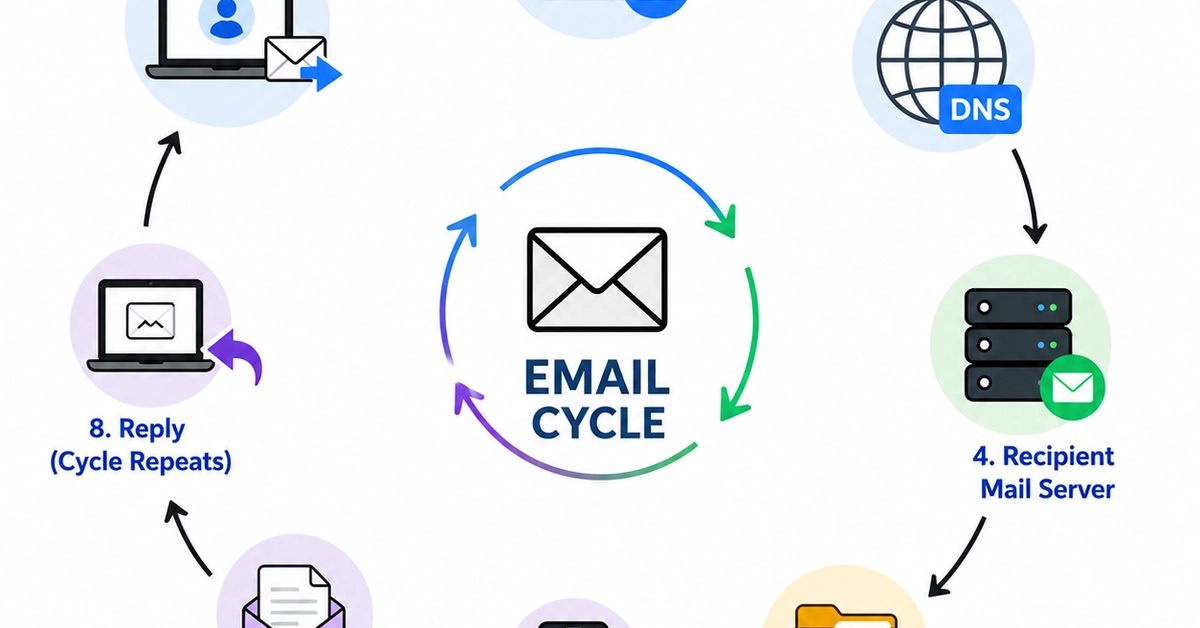
When you hit that button, a cascade of activity begins. It’s a complex dance involving SMTP servers, DNS lookups, DKIM signatures, SPF records, and DMARC policies. All before your message even thinks about landing in someone else’s inbox.
Let’s follow a hypothetical [email protected] sending to [email protected].
First, Gmail already knows you’re you. You logged in. Your identity is verified. No impersonators allowed. This initial authentication is critical. Otherwise, anyone could pretend to be you.
Then, your email gets handed off to Gmail’s SMTP server. SMTP, the Simple Mail Transfer Protocol. It’s the internet’s postman. Its job: send, route, relay. Your message isn’t just a string of text anymore. It’s now bundled with metadata: sender, receiver, timestamps, routing details.
And here’s where it gets interesting. Gmail slaps on a DKIM signature. Think of it as a digital, tamper-proof seal. It cryptographically verifies that the email genuinely came from Google and hasn’t been altered mid-flight. If even a comma changes, the seal breaks.
Now, where does this digital letter go? Gmail consults the internet’s phonebook – DNS. It queries for yahoo.com’s MX record. This tells Gmail precisely which mail servers handle Yahoo mail. Think of it as asking, ‘Which post office branch accepts mail for this address?’
Your email then fractures into packets, zipping across networks, through routers, and across various internet service providers. All in milliseconds. It’s a high-speed, invisible transit.
But the receiving end, Yahoo, isn’t a naive recipient. It doesn’t just blindly accept the incoming mail. Cybersecurity is paramount. Yahoo performs rigorous checks. Is this really from Gmail?
First up: SPF (Sender Policy Framework). Yahoo checks Gmail’s DNS SPF record. Are the servers sending this email authorized to send for gmail.com? If yes, SPF PASS. If no, SPF FAIL. This thwarts fake mail servers.
Next, the DKIM signature is re-validated. Yahoo fetches Gmail’s public key from DNS, verifying the signature and ensuring the message hasn’t been tampered with. DKIM PASS. Tampered: DKIM FAIL. Integrity secured.
Then comes DMARC (Domain-based Message Authentication, Reporting & Conformance). This is the traffic cop. DMARC dictates what happens if SPF or DKIM fails. Should the email be allowed, quarantined, or outright rejected? A p=reject policy means unauthorized emails go straight to the digital void. This is a massive defense against phishing and spoofing.
Even with authentication passed, Yahoo still scans for malicious content: suspicious links, malware, spammy keywords. If it passes all these hurdles, then and only then, is your email delivered to Tom’s inbox.
Behind that tiny Send button is an entire backend ecosystem quietly working in milliseconds.
It’s a fascinatingly complex, yet remarkably efficient, system. A proof to decades of engineering. And surprisingly, for all its complexity, it works. Most of the time.
Why Email Security Still Matters
Despite SPF, DKIM, and DMARC, the email security landscape is a constant battle. Attackers are sophisticated. They exploit the inherent trust in email systems to deliver phishing scams, malware, and ransomware. A slight misconfiguration in an SPF record, a clever spoofing technique, or a zero-day vulnerability can bypass these protections.
This ongoing arms race means that understanding these protocols isn’t just for network engineers. It’s for anyone who relies on email for critical communication. It’s about recognizing the digital fingerprints left on every message, and appreciating the unseen infrastructure that keeps our digital conversations flowing – mostly – securely.
Is Email Still Relevant?
Some might argue that email is an antiquated relic. Dead on arrival. Replaced by Slack, Teams, or whatever new chat app is currently trending. But the sheer volume of emails sent daily—360 billion—tells a different story. Email remains the bedrock of professional communication, a formal channel for documentation, and a universal standard. Its resilience isn’t just about inertia; it’s about its adaptability and its deep integration into global infrastructure. When you need a verifiable record, a broad reach, or a platform that works across any device, email still reigns supreme.
The Humble Email Header: A Detective’s Best Friend
Every email carries a treasure trove of information in its headers. These aren’t just technical details; they’re clues. Analyzing the Received: headers, for example, can trace the path an email took, reveal intermediary servers, and pinpoint potential points of origin for spam or spoofed messages. DKIM and SPF results are often logged here, providing direct evidence of authentication success or failure. For anyone troubleshooting delivery issues or investigating a suspicious message, diving into email headers is non-negotiable. It’s where the real story of an email’s journey is told.
🧬 Related Insights
- Read more: Tab Timer: A Deep Dive Into Browser Time Tracking
- Read more: Claude Code: Does Anthropic’s Terminal AI Deliver for Devs?
Frequently Asked Questions
What actually happens when I send an email?
When you click ‘Send’, your email client (like Gmail) passes the message to an SMTP server. This server then uses DNS to find the recipient’s mail server, and the email travels across the internet in packets, undergoing various security checks (SPF, DKIM, DMARC) before delivery.
How does my email stay secure?
Email security relies on protocols like SPF, DKIM, and DMARC which authenticate the sender and verify message integrity. Additionally, receiving mail servers scan emails for malware and suspicious content.
Will this change how I use email?
Probably not. The system is largely invisible. But understanding the layers of security and the journey your email takes can foster a greater appreciation for its reliability and help you identify potential threats.